

Services · Automations
What you do by hand,
done on its own.
Someone fills in your form and the data is saved, you get an alert, that person receives their welcome and the follow-up lands in your diary.
- Data saved
- An alert for you
- Welcome sent
- Follow-up scheduled

Example
An enquiry gets lost
every week.
A law firm copies the enquiries that arrive by website, email and WhatsApp into a spreadsheet. Some go unanswered. With the flow connected, the contact is saved, the solicitor is alerted and the person who wrote receives a confirmation.
Hypothetical example; not a real client case.
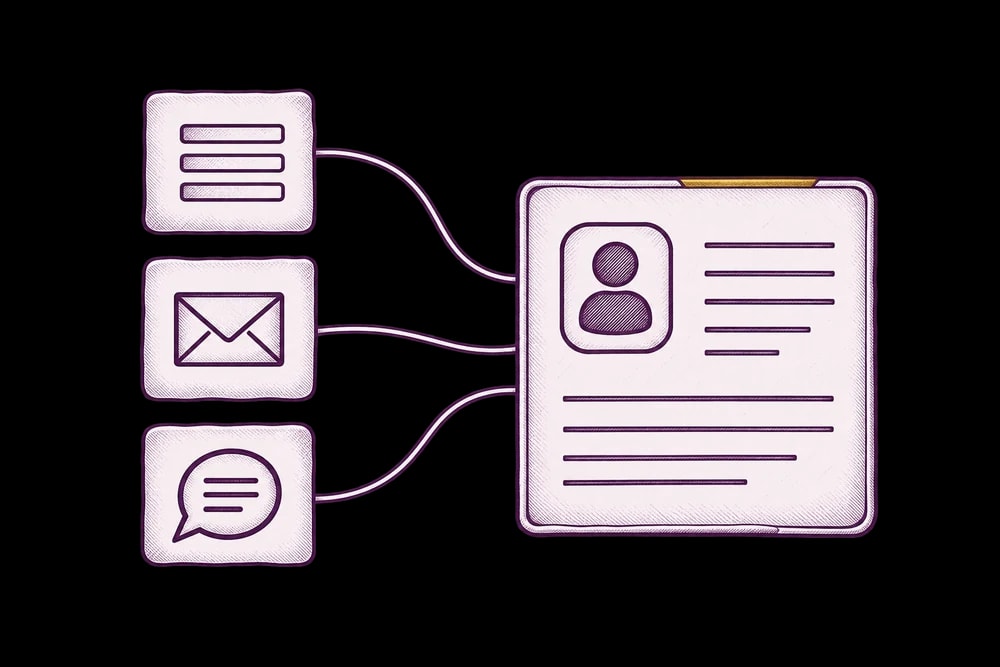
- Form
- Enquiry savedcontact · alert · confirmation



Today / With the system.
Today: You copy the contact into a spreadsheet.
With the system: The contact is saved automatically.
Today: You remember to reply.
With the system: The confirmation goes out as soon as it arrives.
Today: You hunt for the welcome email.
With the system: The welcome arrives with your instructions.
Today: You note down when to call back.
With the system: The follow-up sits in your diary.
 You copy the contact into a spreadsheet.
 You remember to reply.
 You note down when to call back.
What about a CRM?
Your client list, with a memory.
A CRM is where you keep each client with their history: who they are, what they asked for and when it is time to write to them again.
If you already have one
I connect it to your website, your email and WhatsApp, and adapt it to the way you work.
If you do not have one
I build one to fit you, with what you really use and nothing more.
If a spreadsheet is enough
Often a well-connected spreadsheet does the job. I will tell you before you pay anything.
How I do it.
- 01
I look at what happens today
I follow an enquiry or an order from start to finish and note down every step you do by hand.
- 02
I define what triggers what
I decide when each step fires, where each piece of data goes and who gets alerted. You see it before I build it.
- 03
I build it with what you already use
I connect your tools with lightweight ones, so your costs do not grow with new subscriptions.
- 04
I test it and explain it
I test it with your real cases and leave you in writing how it works and what to check if something fails.


What is included
What I prepare for your business.
- 01
The map of how you work today
I go step by step through what happens with each enquiry or order, and where your hours and your clients slip away.
- 02
The flow
I define what triggers what: when data is saved, who is alerted and what message goes out, based on the way you really work.
- 03
The connections
I link the form, email, spreadsheet, client manager or WhatsApp, depending on what you already use.
- 04
Messages and alerts
Welcomes, confirmations and reminders, and an alert for you when something is yours to handle, so nothing depends on remembering.
- 05
Testing
I test it with the cases that come up most before switching it on.
- 06
The walkthrough
I explain how it works and what to check if something does not arrive one day, and I leave it in writing.

What you need and what you do not.
You need
- Access to the tools you use today: email, spreadsheet, form, calendar.
- A description of what you do by hand, even if it is not tidy.
You do not need
- An expensive CRM.
- Knowing about technology.
- Having your processes written down.
Price.
From €790
The “from” price is the starting point. Your advisor gives you the final figure in the proposal, and it is agreed in writing before we start.
What changes the price
- How many steps there are in what is being automated.
- How many tools need connecting.
- Whether any step uses artificial intelligence, for example sorting enquiries.
- Whether the data needs tidying first.
Prices exclude VAT. The scope is agreed in writing.
Frequently asked questions.
What can be automated?
Almost anything you do by hand and repeat: moving the details from a form to a spreadsheet or to your management tool, sending the welcome message, alerting you to a new contact, reminding you of an appointment. If you do it every week and it eats your time, it’s worth a look.
Do I need an expensive CRM?
Almost never at the start. First I look at what you already pay for: often a well-connected spreadsheet, your email and your forms are enough. If you already have one, I connect it and adapt it; if you have none and you need one, I build one to fit you.
Can you work with the tools I already use?
Yes, and it’s the first thing I check. There’s no point putting another subscription on top if what you have already does the job.
Is it cheaper to pay for several separate apps?
Sometimes, yes, if you’re very small. But there comes a point when you pay for five overlapping subscriptions and copy data between them by hand on top of that. That point can be calculated, and I’ll tell you what I see in your case, even if it’s that it doesn’t suit you yet.
And if something breaks?
Before handing it over I test it on the cases that come up most and explain how it works, so you know what to check if something doesn’t arrive. What happens afterwards and who maintains it, I put in writing in the proposal.
How much does an automation cost?
There is a starting point (from €790) and the final figure depends on how many steps it has and how many tools need connecting. I give it to you in the proposal, before you start.
What do I need to get started?
Access to the tools you use and a description of what you do by hand. With that I work out what is best to automate first.